Posts

How to access & use sparkSQL via PySpark in spark1.5?

To access the sparkSQL in spark1.5, follow just following steps: 1. Import the Spark Context and hive context  from pyspark import SparkContext, SparkConf from pyspark.sql import HiveContext from pyspark.sql.functions import col 2. Set the application name and configurations [This is  mandatory only if you are running your code in yarn-client mode] appName = "SqlPyspark" conf = SparkConf().setAppName(appName) conf.setExecutorEnv('PYTHONPATH', '/opt/spark/python:/opt/spark/python/lib/py4j-0.8.2.1-src.zip') 3. Create spark and Hive contexts:  sc = SparkContext(conf=conf) hc = HiveContext(sc) 4. Now use hive context to access database and perform any operations: hc.sql(“show databases“) 5. If you wish to compile all above in a python file , then run the following command to access/operate on sparkSQL: /opt/spark/bin/spark-submit --master yarn  --deploy-mode client  --py-files [Other py files if any]...

How to know the Wifi Password in Windows/Linux/MAC OS:

Windows OS:          Open the command terminal as : cmd           Run the following command:          netsh wlan show profile name=[wifi-name]  key=clear           Now, under the Security Settings section, Value 'Key Content' is the Wifi Password.        2.  MAC OS:                      Open the terminal & fire the following command:           security find-generic-password -wa [wifi-name]           The result displayed in plain text is the Wifi Password.       3. Linux OS:           Open the terminal and run following command          cat /etc/NetworkManager/system-connections/[wifi-name] | grep psk=

Tableau integration with sparkSQL and basic data analysis with Tableau

Steps for Tableau integration with sparkSQL and basic data analysis: ================================================ Run the spark-Sql in NameNode[sparkSql server node] as: /opt/spark/sbin/start-thriftserver.sh   --hiveconf hive.server2.thrift.port=10001 Download & install  tableau-10 from the site:  https://www.tableau.com/products  [14-days trail version] Download & install tableau driver for spark-SQL:  https://downloads.tableau.com/drivers/mac/TableauDrivers.dmg Open tableau & connect to sparkSQL. Provide server as NameNode IP & port as 10001 [as in step-1 above] Select Type as ‘SparkThriftServer’ Select Authentication as  ‘Username and password’ Provide username as ‘hive’ [This is same as in hive-site.xml] Provide password as ‘hive@123’ [This is same as in hive-site.xml] Search & select the database name in ‘Select Schema’ dropdown. [This is the same parquet db sparkJobs created ] ...

How to connect SQL workbench to SparkSQL

Steps to setup sql workbench for accessing spark-sql datases: Start sparkSql on Namenode as:  /opt/spark/bin/spark-sql --verbose --master yarn --driver-memory 5G --executor-memory 5G --executor-cores 2 --num-executors 5 Download SQL workbench, for macOs download from:  http://www.sql-workbench.net/Workbench-Build117-MacJava7.tgz Extract the downloaded tgz file and launch SQLWorkbenchJ Copy the jar   /opt/spark/lib/spark-assembly-1.2.1-hadoop2.4.0.jar [Or, equivalent as per the hadoop version] from Namnode(spark-sql server) On SQLWorkbench, from menu go to file-> Manage drivers. Click on 'Create new entry' button on top left corner. Provide the driver name such as spark-sql_driver. In Library section, select the jar (needed for jdbc driver) copied from name node in step 3 above. In the classname section, click on the 'Search button'.  From the pop up window, select the driver 'org.apache.hive.jdbc.HiveDriver' and click 'Ok' From...

The points to remember while developing a spark application

A. The resources allocation should be optimised i.e following needs to be considered: 15 Cores/Exec can lead to HDFS I/O Throuput is Bad; so best core per executor is 4 to 6 Max(385MB,0.07*ExecMemory) is required for direct memory i.e Overhead.  Don’t have too high executor memory ; Garbage collections & parallelism would be impacted.  Consider at least 1 core & 1GB for the Os/hadoop  Consider the resources for one Application Master  B. The no of partitions should be optimised i.e initial partitions and intermediate partitions  No of Initial partitions = No of blocks in hadoop or same as value of spark.default.parallelism  Size of each SufflePartitions shouldn’t be more than 2G, otherwise job fails with IllegalArgument MAX_VALUE.  No of child partitions >=< No of partitions in parent RDD.  C. Always use reduceByKey  instead of groupByKey and  treeReduce instead of reduce wherever possible. D. Tak...

Setup hadoop and spark on MAC

Image
In this article, i'll take you through simple steps to setup hadoop/spark and run a spark job. Step1: Setup the java run the command:  java version & if not installed then download the one.  After installation get the JAVA_HOME with command: /usr/libexec/java_home Update the .bashrc with the JAVA_HOME as: export JAVA_HOME= Step-2 Setup SSH Keyless  Enable remote login in System Preference=> sharing  Generate rsa key:  ssh - keygen - t rsa - P ''   Add the RSA key to authorized key: cat ~ / . ssh / id_rsa . pub > > ~ / . ssh / authorized_keys Check ssh localhost ; it shouldn't prompt for the password. Step-3: Setup hadoop Download hadoop2.7.2.tar.gz:  http://www.apache.org/dyn/closer.cgi/hadoop/common/  Extract the tar file and move the hadoop2.7.2 to /usr/local/hadoop Setup the configuration files: [If the configuration files doesn't exist as they are copy from corresponding template files] Up...

Few Important hadoop commands

To check the block size and replication factor of a file:   hadoop fs -stat %o hadoop fs -stat %r   How to create a file with different block size and replication factor of a file: hadoop fs -Ddfs.block.size hadoop fs -Ddfs.replication.factor 2 How to change the block size and replication factor of a existing file: hadoop dfs -setrep -w 4 -R   there are two ways: either change in hdfs-site.xml & restart the cluster  or, copy the files using distcp to another path with new block size & delete the old ones as: hadoop distcp -Ddfs.block.size=XX /path/to/old/files /path/to/new/files/with/larger/block/sizes. get multiple files under a directory: hadoop fs -getmerge Start hadoop ecosystems: start-dfs.sh, stop-dfs.sh and start-yarn.sh, stop-yarn.sh can be done through the master. or, hadoop-daemon.sh namenode/datanode and yarn-deamon.sh resourcemanager  Need to do on individual nodes. To View the FSImage to Text:  hdfs oiv -p...

Important points on Apache spark

Spark Basics: Iterative programs (ML) Spark Scala(Functional programming language) has: Immutability, Lazy transformation(Execution before evaluation), type inferred, Because of Immutability, we can Cache & distribute. RDD is a big collection of data structure. RDD is big data collection of with properties: immutable,distributed & lazy evaluation,time Inference, resilient(Fault-tolerant) & cacheable. Spark Remembers all its transformation, Transformation doest apply any action. So it has multiple copies.(Bad!!!!!!!!! ) Scala code runs on top of JVM. Spark-shell is interactive.  var means immutable. but immutable value can be mapped to new value. Interactive Queries Real Time & batch processing unified Good use of resources (Multi-core),Network speed,disk Velocity is as much important as Volume. Realtime processing is as much important as Batch processing Existing map-reduce has tightly coupled with API. Spark makes use of Hadoop distributed storage....

Some Linux Concepts.

How to check the utilisation of each cores: mpstat -P ALL 1 & lscpu or cat /proc/cpuinfo  ps -aeF  gives the details of which core ID is being used for a process. top -H -p => gives all the details of threads of all the processes. lsof -t => Gives the PID of a file name. netstat -a => all ; listening + established; -n => suppress host/port name resolution; -t => only tcp ; -p => program name; -r routing; -i interface   Find files smaller than 2K: find -type f -mindepth 2 -size -1c  Find files which are not older than 2 days: find -type f -mtime -2  stat zzz (Gives all the statistics of a file); stat %i ; %F; %G; %U; %b ; atime => when it was last accessed , mtime => when the file was last modified, ctime when the file was  last changed (changed means file attributes were changed)  Unix File system: A directory has name ...

Tested & verified powerful python oneliners

1. Reverse the words in odd position of a string and maintain the title cases for the reversed words. python -c "for p in [word[::-1].title() if index % 2==0 else word  for index,word in enumerate('A Quick Lazy Dogs Jumps Over The Fox'.split()) ]: print p," 2. Print only the lines of a file whose 3rd field is either of '123','234','245'. python -c "for p in [ line.strip('\n') for line in open('file.txt').readlines() if int(line.split(',')[2]) in [123,234,245] ]: print p"                            --------------OR------------------  cat file.txt | python -c "import sys; [sys.stdout.write(line) for line in sys.stdin if int(line.split(',')[2]) in [ 123,234,245 ] ]" 3. Print all the unique words in a file. python -c "for p in set(word for line in open('file.txt').readlines() for word in line.strip('\n').split(',')): print p, " 4. Awk equivalent: pr...

Working with IPV6 addresses in Linux

Well, working with IPV6 addresses is little bit tricky unlike IPV4 addresses. IPV6 addresses are 128 bit-length with 8 octets each of 16 bits. In this post,  i'll explain my working experience with IPV6 addresses. While working with IPV6, i found that sipcalc command is very useful on deciding which ipv6 address to use and what is the network corresponding to the ipv6 address. Hence, lets install sipcalc in Linux using bellow steps: Step1: Download the sipcalc rpm wget ftp://ftp.univie.ac.at/systems/linux/fedora/epel/6/x86_64/sipcalc-1.1.6-4.el6.x86_64.rpm Step2: Install the rpm rpm -ivh sipcalc-1.1.6-4.el6.x86_64.rpm Lets suppose i need at most 2 IPV6 addresses in a subnet. I have 128-2 => 126 network bits & 2 host bits. That means 2^2 hosts per subnet of length /126. Example: 2001:db8:1:1:0:0:0:0/126 is a subnet having 4 possible ipv6 addresses as: 2001:db8:1:1:0:0:0:0 => network address 2001:db8:1:1:0:0:0:1 & 2001:db8:1:1:0:0:0:2 => Usable host...

How to configure http/tftp server on cisco router?

Suppose, you want to transfer files between cisco routers. You can choose either tftp or http/https or scp/rcp or ftp. lets say you want to transfer files on disk0: directory on one cisco router to another cisco router. Here are the ways to configure http/tftp server for both IPV6 & IPV4. Configuring http server on cisco router ========================== R1(config)#ip http server R1(config)#ip http port 8080 R1(config)#ip http path disk0: R1(config)#username cisco privilege 15 password 0 cisco Now, you can transfer files from the above configured router to another router say R2  using following commands. 1. If you want to copy files using ipv4 address then:  R2#copy http://[usr] :[passwd] @[ip address] :8080/ Example:  R2#copy http://cisco:cisco@10.10.10.10:8080/xyz.gz disk0: *2. If you want to copy files using ipv6 address then:  R2#copy http://[usr] :[passwd] @[ipv6 address ]:8080/[filename] [destination path] Example: ...

How to mount a remote directory in unix?

Suppose you want to mount a remote directory and use it as if directory is present on the same server, here are the steps: A. Execute these steps on the remote server: /etc/init.d/nfs start under /etc/exports add this line :  [Directory to allow access on this server] [Server IP to allow access]     (rw,sync) run exportfs -r B. Execute these steps on the Local server: mount -o nolock :  [Remote server IP] :[Remote directory]    [Mount Directory]

How to configure NTP/SNTP in ubuntu?

NTP/SNTP is a protocol which is used for syncing the time between multiple nodes in the network. Here are the steps to Configure NTP client in Ubuntu: update /etc/ntp.conf with your server. server ntpdate /etc/init.d/ntpd restart Update the firewalls rule to accept NTP traffic: iptables -A OUTPUT -p udp --dport 123 -j ACCEPT iptables -A INPUT -p udp --sport 123 -j ACCEPT Check if the server is picking up right NTP server:  sudo ntpq -np    remote           refid      st t when poll reach   delay   offset  jitter ============================================================================== *81.76.22.20   8.78.8.80      2 u  116  128  377    0.540   -9.006   5.55 Star indicates the server is picking up right server.

Basics of MPLS Core Configuration

Image
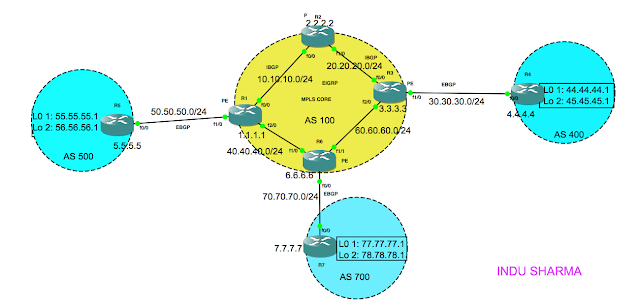
In this blog, I'll tell you how to configure the basic MPLS on the Core. Before we begin with the MPLS configuration, we should make sure that all nodes are reachable from each other. In the above topology, i've already configured ip configuration as per the IP addresses shown in the diagram, ibgp & eigrp in the core and ebgp in the external links. Hence, i can reach to anynode from anynode in the above diagram. Why the reachability is needed? thats because MPLS uses labels to switch the packets and those labels are distributed using the tcp 646 for ldp. However, while discovering the label distribution protocol neighbors, hello packets are exchanged using udp. Now, lets configure the MPLS ldp in the above core: on R1(PE): R1#config t R1(config)#mpls ip R1(config)#inetrface FastEthernet 0/0 R1(config-if)#mpls ip R1(config-if)#inetrface FastEthernet 2/0 R1(config-if)#mpls ip R1(config-if)#end R1#wr mem On R6(PE): R6#config t R6(config)#mpls ip R6(con...

Advance BGP Configuration

Image
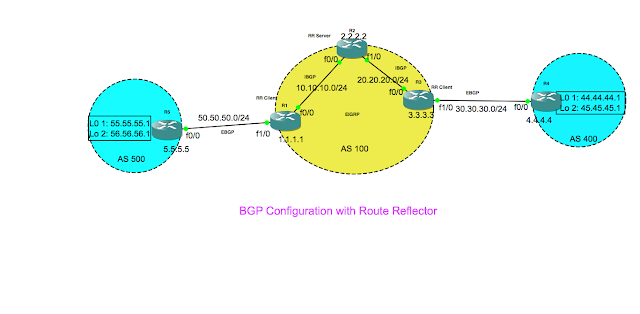
In this blog, i provide the detailed steps for configuring the bgp. I use the above topology to configure the bgp. In the above topology, i'm going to configure ebgp between R5 & R1 and between R4 & R3. In the core Autonomous system AS100, i'm going to configure the eigrp protocol. The most important thing you should keep in mind is, the neighbour id is the loopback ip address for all the bgp nodes. However, in the case of e-bgp the TTL is always set to 1, which causes the packets to get dropped while setting up the TCP connection. & hence i'll enforce the TTL value to 2 using ebgp-multihop 2 command. Rest of the things are pretty much straight forward, just try out the configurations in your setup, you will learn easily. Following are the steps you need to follow to configure the bgp on the above topology. Step1:  Lets configure the router R5: interface Loopback0 ip address 5.5.5.5 255.255.255.255 interface Loopback1 ip address 55.55.55.55 255.25...

Tested & verified 50 useful AWK One Liners

1. How to print the line which matches /regex/?    awk '/regex/{print $0}' 2. How to print the line immediately above the line containing /regex/? awk '{x=y"\n"$0;y=$0};x~/regex/{gsub(/\n.*/,"",x);print x}' 3. How to print the line immediately after the line containing /regex/? awk ' {x=NR+1};NR==x{print $0}' 4. How to get the uniq lines from a file & the count the line is repeated? awk '{arr[$0]++;};END { for (i in arr) { print i "\t" arr[i];} }' 5. Precede each lines with its line number. awk ‘{print NR “\t” $0}’ 6. Precede line numbers only on the non-blank lines. awk 'NF{++c; print  c "t" $0};NF==0{print $0}' 7. Count the Lines. awk ‘END{print NR}’ 8. Printing words of a line in reverse order awk '{for (i=NF;i>0;i--){ printf  "%s%s",$i,FS  } print "" }' 9. Printing lines of a file in Reverse order. awk ‘{ arr[NR]=$0...