Posts

Basics of MPLS Core Configuration
Image
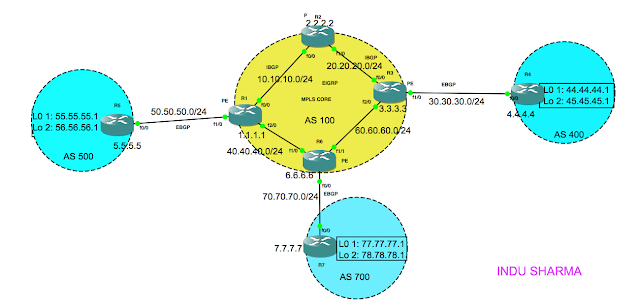
In this blog, I'll tell you how to configure the basic MPLS on the Core. Before we begin with the MPLS configuration, we should make sure that all nodes are reachable from each other. In the above topology, i've already configured ip configuration as per the IP addresses shown in the diagram, ibgp & eigrp in the core and ebgp in the external links. Hence, i can reach to anynode from anynode in the above diagram. Why the reachability is needed? thats because MPLS uses labels to switch the packets and those labels are distributed using the tcp 646 for ldp. However, while discovering the label distribution protocol neighbors, hello packets are exchanged using udp. Now, lets configure the MPLS ldp in the above core: on R1(PE): R1#config t R1(config)#mpls ip R1(config)#inetrface FastEthernet 0/0 R1(config-if)#mpls ip R1(config-if)#inetrface FastEthernet 2/0 R1(config-if)#mpls ip R1(config-if)#end R1#wr mem On R6(PE): R6#config t R6(config)#mpls ip R6(con...
Advance BGP Configuration

Image
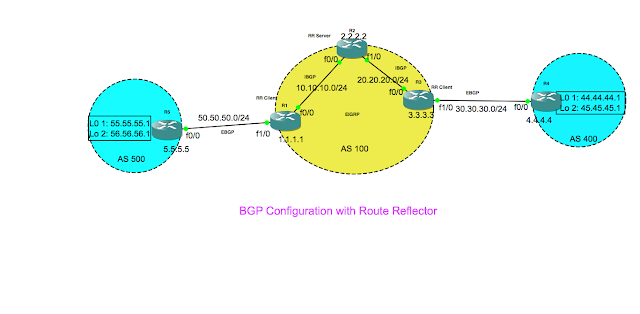
In this blog, i provide the detailed steps for configuring the bgp. I use the above topology to configure the bgp. In the above topology, i'm going to configure ebgp between R5 & R1 and between R4 & R3. In the core Autonomous system AS100, i'm going to configure the eigrp protocol. The most important thing you should keep in mind is, the neighbour id is the loopback ip address for all the bgp nodes. However, in the case of e-bgp the TTL is always set to 1, which causes the packets to get dropped while setting up the TCP connection. & hence i'll enforce the TTL value to 2 using ebgp-multihop 2 command. Rest of the things are pretty much straight forward, just try out the configurations in your setup, you will learn easily. Following are the steps you need to follow to configure the bgp on the above topology. Step1:  Lets configure the router R5: interface Loopback0 ip address 5.5.5.5 255.255.255.255 interface Loopback1 ip address 55.55.55.55 255.25...

Tested & verified 50 useful AWK One Liners

1. How to print the line which matches /regex/?    awk '/regex/{print $0}' 2. How to print the line immediately above the line containing /regex/? awk '{x=y"\n"$0;y=$0};x~/regex/{gsub(/\n.*/,"",x);print x}' 3. How to print the line immediately after the line containing /regex/? awk ' {x=NR+1};NR==x{print $0}' 4. How to get the uniq lines from a file & the count the line is repeated? awk '{arr[$0]++;};END { for (i in arr) { print i "\t" arr[i];} }' 5. Precede each lines with its line number. awk ‘{print NR “\t” $0}’ 6. Precede line numbers only on the non-blank lines. awk 'NF{++c; print  c "t" $0};NF==0{print $0}' 7. Count the Lines. awk ‘END{print NR}’ 8. Printing words of a line in reverse order awk '{for (i=NF;i>0;i--){ printf  "%s%s",$i,FS  } print "" }' 9. Printing lines of a file in Reverse order. awk ‘{ arr[NR]=$0...

Network Management a brief introduction

Network management has been very crucial technology due to the multivendor, multi-tenant and multi-serivice environment.Today, all the good telecom service provider, Internet service providers, and banks need to have very good management system to provide the better user experience and quality of service. Proper network management system ensures very less mean time to repair the service in case of failures in the network there by improving overall customer experience. This article makes you understand about the management system in very layman terms. 1. What is network management system? Network management system(NMS) is a combination of software and hardware used to administer and monitor the computer networks devices and networked applications.Unlike, element management system, NMS is concerned about how the network elements are tied up together in the environment, and the impacts one makes to the other.Today there are so many vendors which develop NMS so...

How To Configure a Simple VLAN Topology?

Image
Well, this article explains how to design and configure a simple VLAN topology.I use following topology to achieve the same. Objective: Design and configure the 3 VLANs each having single host as shown in the diagram. Following are the steps to configure above vlan topology: Step1: Select the IP address to suit the topology. As VLAN breaks the broadcast domain, we need to select three different subnets.In above topology, each subnet needs two IP addresses.Hence i select Class-C network & 255.255.255.252 as subnet mask.I know you might have already guessed the reason behind selecting that subnet mask.This mask allows you to configure only two IP addresses per subnet.What are the possible subnets?well, its easy! subtract last octet value from 256, which is basically 256-252=4.Now, make the block size of 4.Following are the possible subnets: 192.168.221.0,192.168.221.4,192.168.221.8,192.168.221.12 & so on. In each subnet lowest ip address is network address ...

Few great UNIX commands & useful links

Following are the some advanced UNIX commands which i found very useful. DNS (Domain Name Service) host string Perform forward or reverse lookup on string dig @nameserver string Lookup string's host info from nameserver System Hardware Information grep -i memtotal /proc/meminfo Find total amount of RAM in the system dmidecode -q Display DMI/SMBIOS information cat /proc/cpuinfo Display CPU information egrep '(vmx|svm)' /proc/cpuinfo See if a processor supports hardware virtualization lspci -tv Display PCI information lsusb -tv Display USB information hdparm -i /dev/sda Display disk information for sda Quick HTML Editing Site Wide find . -type f -print -exec sed -i -e 's|X|Y|g' {} \; Replace all X's with Y's in all files this directory and below. perl -pi -w -e 's/X/Y/g;' *.txt Replace all X's with Y's in all files ending with *.txt find -name '*' | xargs grep 'string' Print filename and all lines containing ...